Screenshot, slightly improved.
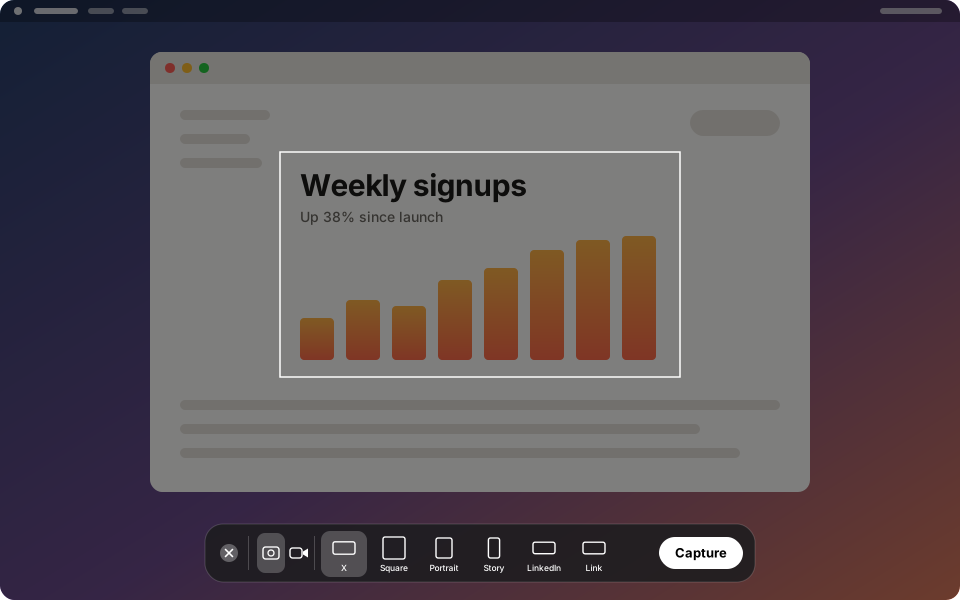
A macOS menu bar utility that works like the built-in Screenshot tool, except every screenshot and screen recording comes out at the exact pixel size the platform you are posting to expects.
curl -fsSL https://realworldbuilder.github.io/slightly-improved-screenshot/install.sh | bash
Paste into Terminal. Requires macOS 26 or later. Installs to Applications and launches; read the script first if you like.
What it does
- Fixed-size framesPress ⇧⌘2, drag the frame into place, press Return. The PNG is exactly the preset's size, on the clipboard and in Downloads.
- Video with soundRecord the same frame as an H.264 MP4 with system audio, any microphone, or both, mixed into one track that plays everywhere.
- Retina-exact, or scaled to fitCaptures are pixel-for-pixel where the preset fits the display, and scaled to the exact size where it does not.
- The options you knowTimer, mouse pointer, mouse clicks, clipboard and file output, a rebindable hotkey.
Presets
| X / Twitter | 1600 × 900 |
| Instagram Square | 1080 × 1080 |
| Instagram Portrait | 1080 × 1350 |
| Instagram Story | 1080 × 1920 |
| 1200 × 627 | |
| Open Graph | 1200 × 630 |
Good to know
The first capture asks for Screen Recording access; grant it in System Settings › Privacy & Security › Screen & System Audio Recording and relaunch. The app is not notarized, so install it with the command above rather than by downloading the zip in a browser. To uninstall, quit it from the menu bar and delete it from Applications.